JPG, PNG, WebP and Other Image Formats
ImageRW Guide · Practical image workflow
Image formats are encoding choices. The best one depends on content, transparency, compatibility and the way the file will be delivered.
Quick takeaways
- Match the format to the image content and delivery workflow.
- Use representative files when comparing formats.
- Confirm browser, CMS and editing-tool compatibility before migrating.
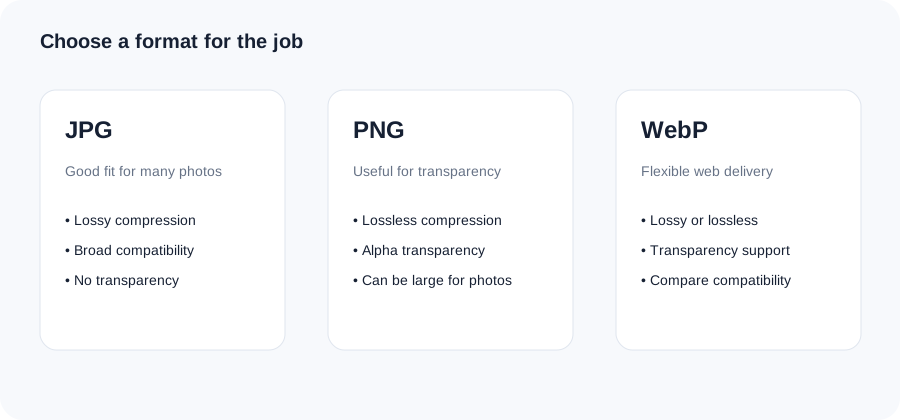
Original ImageRW diagram: JPG, PNG, WebP and Other Image Formats.
JPG
JPG is widely supported and commonly used for photographs. Its lossy compression can produce compact files, but aggressive settings can create visible artifacts.
PNG
PNG uses lossless compression and supports transparency. It is useful for graphics, interface assets and images where exact pixel information matters.
WebP
WebP supports lossy, lossless and transparency workflows and can be efficient for modern web delivery.
Modern formats and compatibility
Other formats may be useful in specific workflows. Before adopting a newer format, confirm that your CMS, browser targets and editing tools support it.
Use real files for testing
A format comparison is most useful with representative images from your own site. One photograph is not enough to predict how a catalog of screenshots, graphics and product photos will behave.
A format test that is easy to repeat
Take one photograph, one transparent graphic and one screenshot. Create JPG, PNG and WebP versions where each format is appropriate, then compare file size and visible detail. Testing representative files is more informative than assuming a single format will always produce the smallest result.
Frequently asked questions
Which image format is best?
There is no universal best format. Choose based on image content, destination and compatibility.
Is PNG lossless?
PNG uses lossless compression.
Is WebP good for photographs?
It can be, depending on quality settings and the publishing workflow.
Image content varies. Test representative files, keep the original and judge the output in the context where people will actually see it.